Your Photos, Your Server: Escaping Google with Self-Hosted Immich
A private home for a lifetime of memories
Contents
Your phone has quietly become the family archivist. Every birthday, holiday, and blurry photograph of a meal you wanted to remember is funnelled, by default, into a cloud service owned by a company whose business is understanding you. Google Photos is genuinely excellent software, but the price of that convenience is handing over an intimate, decades-long record of where you have been, who you know, and what your life looks like. There is now a credible way to keep all of that magic while moving the storage onto a server you control. It is called Immich, and this guide walks through standing it up on a Linux box and pointing your phone at it instead of the cloud.
The Quiet Problem With Cloud Photos
The discomfort with cloud photo services is not paranoia, it is arithmetic. A modern photo library is a machine-readable dossier. Embedded in each image is the precise location and time it was taken; layered on top by the service is face recognition, object detection, and the ability to search your entire life by typing “beach 2019”. That is wonderful when you control it and unsettling when a corporation does, because the same indexing that finds your dog also builds a profile that can be analysed, monetised, or handed over under subpoena.
There is also the matter of leverage. Once tens of thousands of irreplaceable images live in a proprietary silo, the friction of leaving is enormous, which is exactly why pricing tiers creep upward and free storage quietly disappears. Owning your photo infrastructure removes that leverage entirely. You decide the storage limit, you decide who has access, and nobody can change the terms on you.
This is part of a broader pattern worth naming. The same reasoning that pushes people to run their own photo store pushes them to run their own everything else, from finances to search. If you have already looked at keeping your own books with self-hosted Firefly III, Immich is the visual equivalent: the most private data you own, kept on hardware that answers only to you. And once you have several services running, you will want to know when one falls over — which is where a small Uptime Kuma monitoring instance earns its place, watching Immich so you find out about a stalled container before your family does.
What Immich Brings to the Table
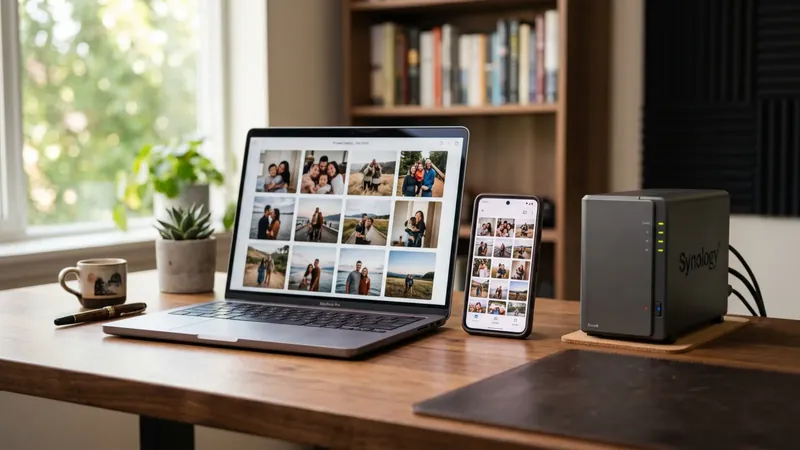
Immich is a self-hosted photo and video management platform built deliberately to feel like Google Photos, and it gets remarkably close. It offers automatic background backup from a mobile app, a fast timeline view, albums and shared albums, a world map plotting where your photos were taken, face recognition that groups people automatically, and machine-learning search that lets you find images by their contents rather than their filenames. Type “red car” or “snow” and it surfaces matching photos, all processed on your own hardware.
It is genuinely impressive, and the development pace is fierce. That pace comes with a caveat we will return to: Immich’s own developers ask you to treat it as software still under heavy development and to never rely on it as your only copy of anything. Take that warning seriously and you get an extraordinary amount of capability for nothing but the cost of a server and some disk space.
Installing With Docker Compose
Immich is distributed as a set of containers orchestrated with Docker Compose, and the project provides the canonical files. Create a directory and fetch them:
| |
Open the .env file and set, at minimum, where your photos will live and a strong database password:
| |
Then bring the whole stack up:
| |
This launches several containers working together: the main server, the web interface, a PostgreSQL database with vector extensions, a Redis cache, and a dedicated machine-learning container. Once they settle, visit http://your-server-ip:2283, create the first admin account, and you have a running instance.
Pointing Your Phone at It
The real test is whether photos flow in automatically. Install the Immich app from the App Store or Google Play, and on first launch it asks for a server URL and login. Enter your server’s address, exactly as you reach it, and sign in with the account you just created.
Inside the app, open the backup settings and choose which albums to back up. Most people select the camera roll and leave it on continuous background backup. The app will then upload new photos as you take them, the same behaviour you are used to from the cloud, except the destination is your own machine. Let the first sync run on Wi-Fi and on charge, because an existing library of tens of thousands of images takes time and bandwidth to transfer.
A practical note: background backup on mobile operating systems is inherently best-effort, since both Android and iOS aggressively suspend apps to save battery. Open the app periodically to let it catch up, and do not assume a photo is backed up until you have confirmed it appears in the timeline.
iOS is the stricter of the two. Apple gives background tasks a short, unpredictable window and will not wake a suspended app just because you took a photo, so the reliable pattern on an iPhone is to open Immich once a day and let the foreground sync clear the queue. On Android the app can generally run a persistent background upload, but battery-optimisation settings will happily kill it, so exempt Immich from optimisation for that phone. Either way, treat the app’s own backup counter as the source of truth: it shows how many assets are pending, and only when that reaches zero has everything actually landed on your server.
Planning Your Storage
Photo libraries grow relentlessly, and modern phones produce large files, so storage planning is not optional. A rough way to estimate: a year of casual shooting from a single modern phone often lands somewhere between a handful and a couple of dozen gigabytes, and video inflates that dramatically. Multiply by the number of people backing up and the number of years you intend to keep, then add generous headroom.
Put the UPLOAD_LOCATION on a disk you can grow, ideally a dedicated drive or a RAID array rather than your system disk. Many people run Immich on a NAS or a small server with mirrored drives so a single disk failure does not take the library with it. Whatever you choose, the storage strategy should be decided before you import a decade of memories, not after.
The Machine-Learning Container
The feature that makes Immich feel like the real thing is its smart search and face recognition, and these run inside a separate machine-learning container that ships with the stack. When photos are imported, this service generates embeddings that power semantic search and detects and groups faces, all locally. Nothing is sent to a third party.
This is also the most resource-hungry part of the system. On a low-powered machine the initial indexing of a large library can take a long while and will load the processor heavily, so let it grind through in the background. If your server has a compatible GPU, the project documents hardware-accelerated configurations that speed this up considerably. For a typical home setup, a patient CPU-only run during off-hours works perfectly well; you simply wait for the smart features to populate.
Backing Up the Backup
Here is the part nobody enjoys but everyone needs. Immich is your primary store now, which means a server failure could wipe the very memories you moved there to protect. A self-hosted photo service is not a backup; it is a single point of failure unless you make it otherwise.
You must protect two things: the photo files at UPLOAD_LOCATION and the PostgreSQL database that holds all the metadata, albums, and face data. The files can be synchronised offsite with a tool like rclone or restic, and the database should be dumped on a schedule. Immich documents the correct procedure, which uses the database container directly:
| |
Pair that nightly dump with regular offsite copies of the upload folder, and you have a genuine three-copy strategy. Test a restore at least once, because an untested backup is only a hopeful guess.
One nuance that catches people out: the upload folder and the database must be backed up as a consistent pair. If you copy the photo files at midnight but the database dump ran at 2am, a restore can leave you with assets the database does not know about or vice versa. In practice the drift is small and self-correcting, but for a clean restore, snapshot the folder and dump the database close together, ideally with the stack briefly paused. If your storage is on ZFS or LVM, a filesystem snapshot taken at the same instant as the dump sidesteps the problem entirely.
Troubleshooting the Common Snags
A few failures come up often enough to be worth naming before they cost you an evening.
The mobile app can’t reach the server. The single most common cause is entering the wrong URL scheme or port. The app wants the full base, including protocol and port, exactly as your browser reaches it — http://192.168.1.50:2283, not just the IP. If you have put Immich behind a reverse proxy with HTTPS, use the public hostname instead, and make sure the proxy forwards WebSocket connections, which Immich relies on for live updates.
Uploads stall or fail on large videos. If Immich sits behind a reverse proxy, the default request-size limit will reject big files. Raise the body-size limit in your proxy configuration — the exact directive depends on which proxy you run, but the symptom is always the same: photos upload fine, multi-gigabyte videos die partway.
Smart search returns nothing. The machine-learning container has not finished its initial indexing, or it crashed on a low-memory box. Check its logs with docker compose logs immich-machine-learning; if it is being killed by the out-of-memory reaper, either add RAM, add swap, or select a smaller ML model in the admin settings.
The stack won’t start after an update. Immich moves fast and occasionally makes breaking changes to the compose file or environment variables. Before every update, read the release notes, and never update blind on a library you have not backed up that day. Pin to a specific version tag rather than latest if you want updates on your own schedule rather than whenever you happen to pull.
An Honest Verdict
Immich is the closest thing to a self-hosted Google Photos that has ever existed, and for anyone uneasy about handing their family album to an advertising company, it is a revelation. The mobile backup works, the search is uncannily good, and the whole experience feels polished beyond its years. The one rule you must internalise is that it remains fast-moving software under active development, so you keep independent backups and you do not delete the cloud or the originals until you have proven your own setup over time. Treat it with that respect and Immich gives you something genuinely rare: a lifetime of memories living somewhere that answers only to you.
Related Content