Mini PCs as Everything: The £150 N100 Box, Honestly Assessed
Intel's cheapest current chip turned a whole category of tiny boxes into a genuine home-server option
Contents
Intel’s N100 was never meant to be exciting. It’s a four-core Alder Lake-N chip built for Chromebooks and the cheapest end of the laptop market, with a 6W TDP that exists specifically so it can run without a fan in a device nobody expects to do real work. What actually happened is that a handful of Shenzhen manufacturers — Beelink, GMKtec, Trigkey among them — put that same chip into a box the size of a paperback, added a proper SATA or NVMe slot, two or sometimes 2.5GbE network ports, and sold the whole thing for £130–£180. The result is a category that has quietly eaten several jobs that used to need a much bigger, much thirstier machine: a home server, a router, a thin client, a retro-emulation box, a always-on download and media box. The promise on the listing is “does everything a small server needs.” The honest answer is that it mostly does, with one consistent asterisk.
What £150 actually buys
A typical current N100 box — Beelink’s EQ12 or EQ13, GMKtec’s G3, Trigkey’s Green G4 — ships with 8GB or 16GB of soldered or single-slot DDR4/DDR5 RAM, a 256GB–512GB NVMe SSD, dual 2.5GbE or one 2.5GbE plus one gigabit port, and a handful of USB-A and USB-C ports crammed onto a chassis that’s routinely under 130mm on its longest side. The N100 itself runs four cores at up to roughly 3.4GHz turbo with no hyperthreading, paired with Intel UHD graphics good enough for hardware video decode — H.264, HEVC and, on most of these boards, AV1 — which matters more than the CPU number suggests if the box’s job is transcoding video for a media server. Idle power draw across independent reviews and owner measurements clusters consistently in the 6–9W range at the wall, which is the actual headline feature: a box that can sit on 24/7 for a year and add perhaps £15–£20 to an electricity bill, against the £60–£100 a repurposed old desktop or a low-power NAS commonly costs to run over the same period, a comparison laid out in detail here.
The promise versus what four cores actually do
The marketing pitch treats the N100 as a general-purpose small server chip, and for a specific, well-understood set of jobs that holds up. Running a handful of lightweight containers — a DNS-level ad blocker, a home automation hub, a small file share, a reverse proxy — barely touches four Alder Lake-N cores, and the hardware video decode block means even fairly demanding Jellyfin or Plex transcode jobs run without the CPU breaking a sweat, because the actual transcoding happens on a fixed-function block rather than the general-purpose cores. Where the promise runs out is anything that wants sustained multi-threaded CPU work: a from-scratch compile, a CPU-bound game server for more than a couple of concurrent players, or a NAS doing real-time parity calculation across a large array. Four cores with no hyperthreading and a turbo ceiling under 3.5GHz is not a small server in the sense a proper Xeon or even a mid-range desktop chip is — it’s a very efficient appliance for jobs that are I/O-bound or offloadable to fixed-function silicon, and a mediocre choice for anything that’s genuinely CPU-bound.
What the teardown finds
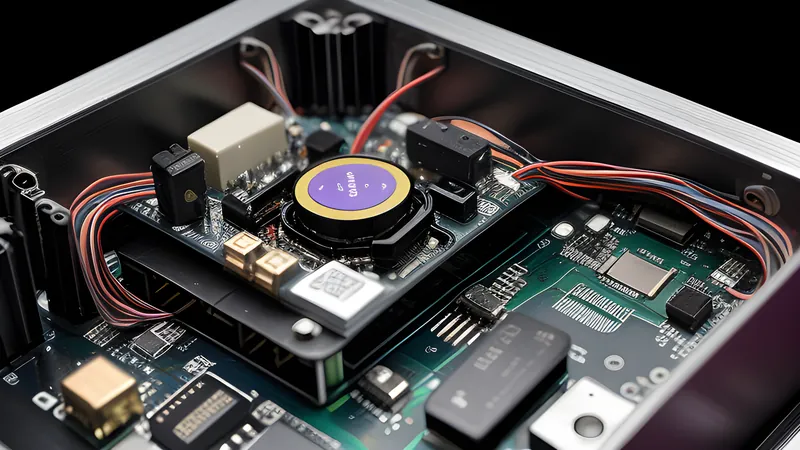
Opening one of these boxes — reasonably consistent across brands, since most share a small handful of reference motherboard designs from the same OEM supply chain — shows the N100 die under a modest aluminium heatsink with a single small fan, a single SO-DIMM or soldered memory package, an M.2 2280 slot for the primary NVMe drive and, on the better boards, a second M.2 2242 slot that manufacturers rarely mention on the box but that owners have found useful for adding a second drive without touching the primary bay. Build quality is honest rather than premium: injection-moulded plastic or a thin aluminium shell, a wall-wart-style external power brick rather than an internal supply, and a single fan that on most units is the only component that will need replacing in the box’s lifetime — it’s a 40mm sleeve-bearing part that’s cheap to source but not rated for the sort of decade-plus lifespan the rest of the board could plausibly deliver. The 2.5GbE controllers across brands are almost universally a small number of Realtek chips, which is worth knowing before buying: Realtek’s 2.5GbE Linux driver support has a real history of instability under sustained load, and it’s worth checking a specific model’s driver situation against your OS of choice before committing, rather than assuming “2.5GbE” on the box means trouble-free 2.5GbE in use.
Where it actually gets deployed
The category has found itself doing a surprising number of jobs that used to need a full desktop tower: a low-power home server running a handful of lightweight containers, a fanless router running OPNsense or pfSense on a board with the right NIC count, a small NAS front-end, or a media box leaning on the hardware transcode block. Owners pushing the format further have started 3D-printing rack mounts to bring several of these boxes into a proper shelf-mounted row rather than leaving them stacked loose on a desk, and for the rarer job that genuinely needs GPU acceleration alongside the low idle draw, an eGPU connected over an Oculink port turns one of these boxes into a surprisingly capable small workstation without giving up the 6–9W idle figure the rest of the time. None of that changes the fundamental shape of the category: it’s an efficient appliance for I/O-bound or offloadable jobs, dressed up by owners in increasingly inventive enclosures once the first box proves the concept.
Barebones, half-built or complete — what to actually buy
Most brands sell the same board three ways: a bare barebones unit with no RAM or storage, a half-built version with RAM only, and a complete unit with RAM and an NVMe drive pre-installed. The barebones route is routinely £30–£50 cheaper and lets a buyer fit whatever SO-DIMM and NVMe drive is cheapest at the time rather than paying the manufacturer’s marked-up bundle price on both — a straightforward saving for anyone already comfortable opening a case, and the case-opening itself is trivial on nearly every model: four screws on the underside, no adhesive, no warranty sticker placed across the seam the way phone manufacturers do it. The complete units earn their premium only for buyers who want it working the moment it arrives, with no separate RAM or SSD purchase and no risk of buying an incompatible module.
Noise, and the fan that will eventually need replacing
Idle noise is close to silent on nearly every model in this class — the single small fan spins slow or not at all under light load, and the boxes are routinely quiet enough to sit on a desk within arm’s reach without becoming a distraction. Under sustained load that changes: the 40mm fans fitted to most of these boards are a cheap, high-pitched part, and several owner reports and long-term reviews note an audible whine developing after a year or two of near-continuous operation as the bearing wears. It’s a genuinely repairable fault — the fan is a standard connector and a five-minute swap for anyone willing to open the case — but it’s also the one component in the box that’s routinely not built to the same multi-year lifespan as the board and chip around it, and buyers running one of these 24/7 as a server should expect to budget a fan replacement, not a whole new box, somewhere in year two or three.
The honest limits
The single-fan cooling and small chassis mean sustained all-core load — a long video transcode queue, a compile job, several VMs doing real work simultaneously — will thermal-throttle on several of these boxes within ten to fifteen minutes, dropping clocks below the advertised turbo figure to stay under the small heatsink’s limits. None of the mainstream N100 boxes include ECC memory, ruling them out for anyone running storage workloads where silent bit-rot genuinely matters. And the single 2.5GbE port on the cheaper models is a real bottleneck if the job is serving several simultaneous 4K streams or handling a large file transfer at the same time as other network-bound tasks — the CPU and the network are rarely what limits these boxes; the thermal ceiling and the port count are.
The Windows licence the listing leans on
A detail worth pricing in separately: many of these boxes ship with a Windows 11 Pro licence pre-activated, and several listings lean hard on that as part of the value pitch, since a genuine retail Windows Pro licence sold on its own commonly runs £30–£100 depending on the channel. For a Linux-bound home server that licence is dead weight — wipe it or ignore it, since it adds nothing to the actual job the box will do. For a media-centre or general-purpose desktop use case, though, a pre-activated Pro licence is real value that a bare Linux-only competitor at the same hardware price doesn’t include, and it’s worth checking which situation applies before comparing two otherwise similar boxes purely on their sticker price.
The verdict
Buy — for the specific and very common job of a low-power, always-on box running lightweight services, a router, or a media server leaning on hardware transcode, the N100 mini PC class is worth its money at the £130–£150 end and a genuinely close call at £180 once memory and storage upgrades push the price up. It’s not worth it at the £220-plus end some bundles reach with 32GB of RAM and a 1TB drive pre-installed — at that price a small used desktop with a real CPU, bought second-hand, out-performs it for CPU-bound work and only loses on idle power draw. Skip it entirely if the job is genuinely CPU-heavy — compiling, real virtualisation with more than two or three lightweight guests, parity-checked storage arrays — where four Alder Lake-N cores are simply not enough silicon no matter how efficiently they’re cooled. For the person replacing an old tower that idles at 60W with a box that idles at 7W and does the same handful of always-on jobs, this is one of the rare gadget categories where the marketing claim and the measured reality genuinely line up.
Related Content